How to cut wrong-fit returns with fitment data in your ERP
Every parts seller knows the email: “This doesn’t fit my truck.” The part comes back, you pay freight both ways, the box is often too damaged to resell, and the customer buys from someone else next time.
It’s tempting to blame the customer. But most wrong-fit returns start earlier, in the data. The fitment was missing, incomplete or out of date, or the listing promised something the fitment table didn’t support. That’s good news, because data problems can be fixed once and stay fixed.
This guide explains where wrong-fit orders come from and gives a seven-step plan to stop them, whatever system you use. At the end we show how we do it in Odoo.
Where wrong-fit orders come from
Trace a stack of “doesn’t fit” returns back to their cause and you usually find one of these:
- No fitment on the part. The part was sold on its title and photo alone.
- Fitment without detail. Year, make and model are there, but not the submodel, engine, drive type or a qualifier such as “without towing package”.
- Stale data. A supplier updated its fitment, but your catalog still has last year’s file.
- Listing and data disagree. The title says “fits 2015–2020” while the fitment table says 2016–2020.
- The customer guessed the vehicle. They knew “2017 F-150” but not the engine or trim.
- Nobody checked. The counter, the web store and the marketplace each took the order without comparing it to the vehicle.
Notice that only one of these is really the customer’s fault, and even that one can be prevented.
The seven-step plan
1. Put fitment on the part record itself
Fitment belongs on the part, in the same system as its stock, price and sales history. Not in a spreadsheet, and not in a separate catalog tool that your counter staff never open. When fitment lives with the part, every channel that sells the part can use it.
2. Load ACES and PIES data from your suppliers
You don’t need to type fitment by hand. The industry already publishes it in two standards:
- ACES lists the vehicles a part fits: year, make, model, submodel, engine and qualifiers.
- PIES describes the product itself: descriptions, dimensions, images, prices and attributes.
Most suppliers provide both. Load them directly and refresh them on a schedule, so your fitment stays as current as your supplier’s. Suppliers such as Turn 14 Distribution, SEMA Data and ShowMeTheParts can deliver this data by API.
3. Keep the qualifiers
The detail that prevents returns is usually in the qualifiers: “2WD only”, “with 3.5L engine”, “excludes heavy-duty”. If your system drops these to fit a simple year-make-model table, it throws away exactly the information that stops a wrong-fit order. Keep them and show them to the buyer.
4. Let every channel search by vehicle
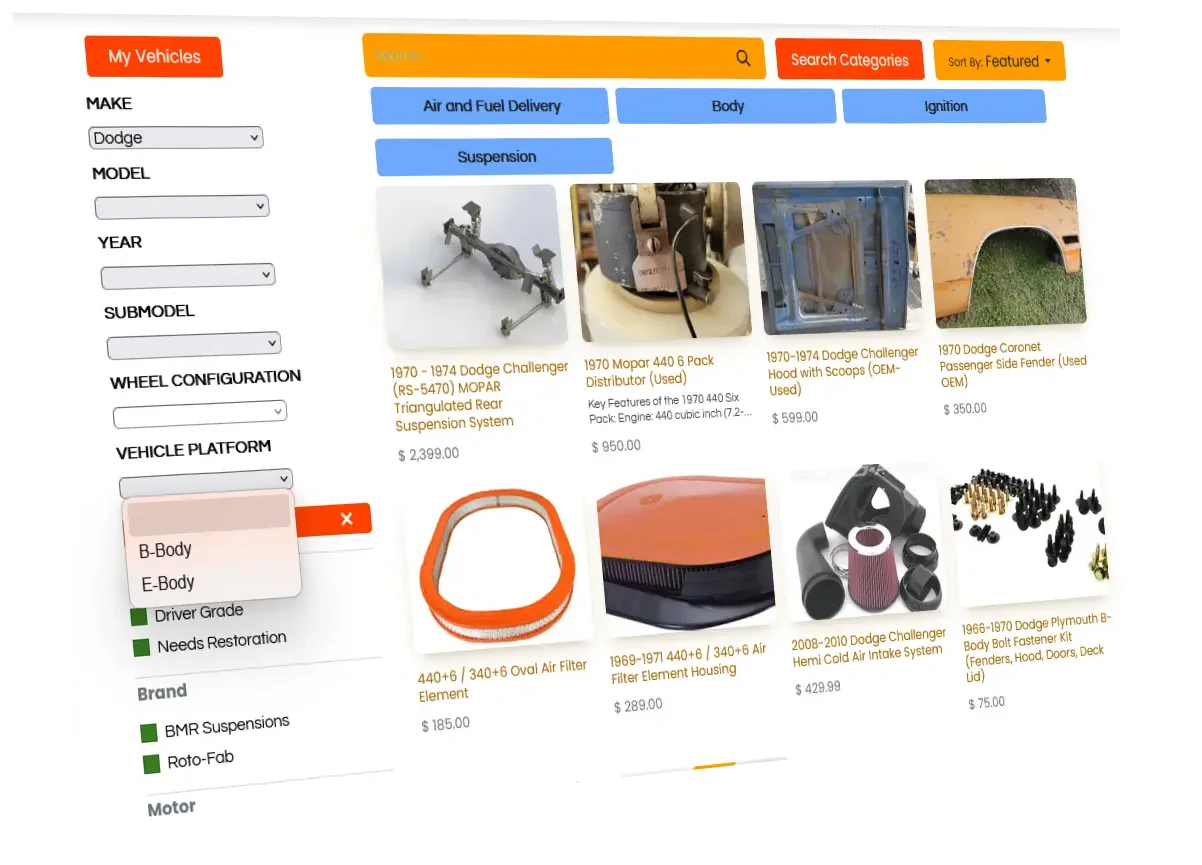
A shopper on your web store, a counter salesperson on the phone and a shop ordering through your dealer portal should all start the same way: pick the vehicle, then see only parts that fit. If one channel searches by vehicle and another by part number alone, the errors move to the weaker channel.
Here is how that looks on our automotive storefront for Odoo: the shopper picks make, model, year, submodel or platform, and the grid shows only parts that fit.
5. Ask for the VIN when the vehicle is unclear
When a customer isn’t sure of the engine or trim, a VIN removes the guessing. A VIN lookup at the counter or on the storefront fills in the exact year, make, model and engine, and the fitment search does the rest.
6. Check fitment before the order ships
Search is the first defense; a check at the order is the second. When the customer’s vehicle is on the order, the system can confirm that every line fits before the warehouse picks it, and flag the ones that don’t for a person to review.
7. Turn every return into a data fix
When a part comes back as “doesn’t fit”, record the reason against the part and the vehicle. A weekly look at those returns shows which fitment records are wrong, and fixing them stops the same return from happening again. Without this loop, the same mistake gets shipped over and over.
Where AI helps
With fitment, listings and returns in one database, AI can take on the checking that nobody has time for:
- Mismatch checks: flag listings where the title, the fitment table and the part’s specs disagree, before a customer buys.
- Return reasons, sorted: read return reasons and customer messages and group them by part and cause, so you fix the record behind repeat returns.
- “Will this fit my car?” answered from your data: reply to customer questions from your own fitment table, with a person stepping in for anything unclear.
How we do it in Odoo
Standard Odoo has no vehicle or fitment model, so we add one with our own modules, inside the same database as your stock, orders and accounting:
| Step | In one Odoo system |
|---|---|
| Fitment on the part | Fitment module: year, make, model, submodel and engine on every part, with qualifiers |
| ACES and PIES from suppliers | PartSync: live API connections to Turn 14 Distribution, SEMA Data, ShowMeTheParts and other suppliers |
| Vehicle search on every channel | Automotive storefront, counter and dealer portal all search by vehicle; Catalog Sync keeps marketplaces in step |
| VIN lookup | VIN lookup at the counter and on the storefront |
| Check before shipping | Compatibility checked on the order before it is picked |
| Returns loop | Return reasons recorded against part and vehicle, with AI grouping them by cause |
See this fix next to the other 18 problems we solve on the problems we solve page, or how it works for online sellers.
Where to start this week
You don’t need a new system to start cutting returns. Pull last quarter’s “doesn’t fit” returns, list the parts and vehicles, and check each fitment record. You will probably find a handful of parts causing most of the problem. Fix those first.
If the fixes keep running into the limits of your current tools, read our checklist of 7 fitment mistakes that cause “doesn’t fit” returns, or see what one system would cost with the cost calculator.
Questions owners ask
What causes most "doesn't fit" returns on auto parts?
Most come from fitment data, not from the customer. The part's fitment is missing, incomplete (no submodel, engine or qualifier) or out of date, or the listing says one thing while the fitment table says another. A smaller share comes from customers who aren't sure of their exact vehicle.
What are ACES and PIES?
They are the auto care industry's data standards. ACES describes which vehicles a part fits (year, make, model, submodel, engine and qualifiers). PIES describes the product itself (descriptions, dimensions, images, prices and other attributes). Suppliers publish both, and an ERP can load them instead of retyping.
Can Odoo handle vehicle fitment?
Standard Odoo has no vehicle fitment. Our Fitment module adds year, make, model, submodel and engine to every part, loaded from ACES and PIES data, so the counter, the web store and the dealer portal can all search by vehicle and check compatibility before an order ships.
Does VIN lookup reduce wrong-fit orders?
Yes. A VIN identifies the exact vehicle, including the engine and trim that customers often don't know. Looking up the VIN at the counter or on the storefront removes the guesswork before the part is chosen.